

In 2026, you don’t need a studio, a crew, or a massive budget to create a cinematic trailer. With text to video AI, anyone can go from a simple script or synopsis to a dramatic, high-impact movie preview in minutes. Whether you’re promoting a real film, a book, a game, or even a brand story, AI has turned the movie trailer format into something anyone can use.
Why Use AI for Movie Trailers?
The movie trailer format works because it compresses a story into an emotional, visual experience: fast cuts, strong voiceover, dramatic music, and memorable lines. Text to video AI lets you automate much of that:
- You write (or paste) a short synopsis or script.
- The AI generates scenes, shots, and transitions.
- Visuals, voice, sound, and pacing are assembled into a trailer-style video.
This is powerful for:
- Indie filmmakers who want professional-looking teasers.
- Authors turning book blurbs into cinematic previews.
- Game devs showing off lore and atmosphere before launch.
- Brands presenting products or campaigns as “mini-movies.”
Instead of manually editing everything, you act as a director: you define the story and tone, and the AI movie trailer maker helps turn it into moving images.
Text to Video vs. Image to Video: How They Work Together
Text to video and image to video are related but different:
- Text to video: You provide descriptions, prompts, or scripts. The AI generates visuals and sequences based on your words.
- Image to video: You upload existing images (concept art, posters, stills), and the AI animates them with motion, transitions, and effects.
For movie trailers, combining both is ideal:
- Use text to video AI to generate core scenes and structure.
- Use image to video to animate key art, character images, or concept frames.
- Blend them into one coherent trailer: dynamic shots, animated stills, text cards, and logos.
A modern platform like Pollo AI supports both approaches, letting you mix AI-generated scenes with your own assets inside a single trailer workflow.
Step 1: Start With a Tight Trailer Script
Before you touch any movie trailer maker or AI tool, you need a compact, clear script. A trailer is not your full story; it’s a hook.
Outline:
- Opening hook (1–2 lines): The world, the problem, or a shocking moment.
- Middle build (4–8 lines): Main conflict, stakes, glimpses of characters or setting.
- Final punch (1–3 lines): A twist, a question, or a powerful tagline.
Example structure:
- “In a city that never sleeps, one secret was buried for 20 years…”
- “Now, as the past returns, three strangers must decide who to trust.”
- “This fall, some doors should never be opened.”
Keep your language visual. The clearer your text, the more accurately text to video AI can choose appropriate imagery, motion, and mood.
Step 2: Choose a Movie Trailer Maker Built for AI
Generic video editors are slow for this type of work. In 2026, it’s smarter to use AI that’s built around text to video and image to video capabilities.
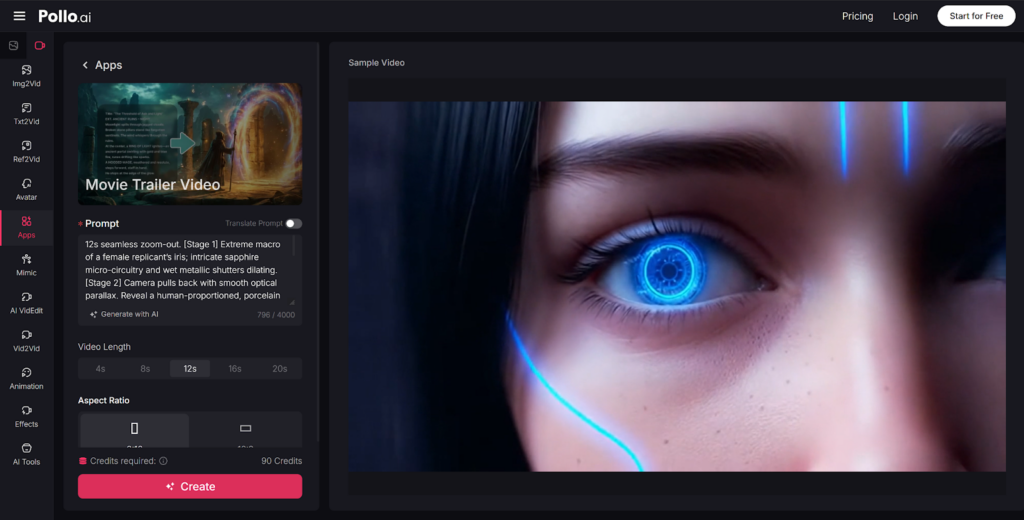
This is where Pollo AI is especially useful. Its AI movie trailer maker designed for AI-first video creation, which means:
- You paste your script or synopsis.
- You choose a trailer style (horror, sci-fi, romance, thriller, fantasy, documentary).
- The AI suggests visuals, shot pacing, transitions, and music automatically.
Pollo AI can also:
- Generate scenes from text prompts (text to video).
- Animate your posters, covers, or stills (image to video).
- Add cinematic title cards and end slates (release date, credits, URLs).
Instead of needing a complex manual timeline, you supervise high-level decisions—tone, pacing, visuals—and let the AI assemble drafts.
Step 3: Guide the AI With Clear Prompts and Structure
Even the best AI needs direction. When using text to video features in a movie trailer maker, think like a director giving notes.
For each segment of your script, you can specify:
- Visual style: “Dark neon cyberpunk city,” “sunset in a quiet village,” “gritty handheld war footage.”
- Camera feel: “Slow push-in,” “fast montage,” “dramatic aerial shot.”
- Mood and color: “Cold blue and gray,” “warm golden tones,” “high contrast, noir style.”
In Pollo AI, you might mark your script into sections:
- Hook lines → high-impact scenes with fast motion.
- Exposition lines → slightly slower scenes that show the world.
- Climax lines → rapid cuts, intense music, and bold text cards.
The more specific your prompts, the closer the AI trailer will feel to your vision.
Step 4: Enhance With Image to Video for Key Moments
If you already have:
- Character art or portraits
- Concept art
- Book covers or posters
- Logo and title graphics
Use image to video features to give them cinematic movement:
- Subtle zooms and pans over artwork.
- Light flares or particle effects over a logo.
- Slow rotations or parallax effects on a poster.
- Animated transitions between still frames, matched to music beats.
Pollo AI can animate your static assets and place them at strategic moments:
- Opening logo animation.
- Mid-trailer character intros or title cards.
- Final reveal: title, release date, and call to action.
This hybrid approach (text to video + image to video) makes your AI-made trailer feel much more professional.
Step 5: Add Voiceover, Sound, and Text Cards
A strong trailer is as much about sound as visuals. A modern AI-powered movie trailer maker should help you with:
- AI voiceover: Generate narration from your script in different tones (deep and dramatic, calm and mysterious, energetic, etc.).
- Music selection: Choose cinematic tracks—tense, uplifting, epic, eerie—matched to pacing.
- Sound design: Hits, risers, booms, whooshes synced to transitions and title cards.
- Text overlays: Short, punchy lines on screen that support or replace narration.
With Pollo AI, you can:
- Select an AI voice profile for the narrator.
- Let the system auto-time the voiceover to scene changes.
- Insert classic trailer text beats like “This summer,” “From the creators of…,” or review quotes.
These elements are crucial to making your trailer feel “real,” not just like a random AI montage.
Final Thoughts
In 2026, AI has turned the movie trailer from a studio-only asset into a universal storytelling tool. With text to video AI and modern platforms acting as your intelligent movie trailer maker, you can transform scripts, blurbs, and ideas into cinematic previews that hook audiences in seconds.
By combining text to video for scenes and image to video for your key visuals—and using a focused tool like Pollo AI to tie it all together—you can create Hollywood-style trailers for films, books, games, or brands faster than ever. The technology is ready; what matters now is your story and how boldly you choose to show it.